Clawdbot in 2026: From Concept to OpenClaw Implementation
If you're tired of balancing tasks or wish you had an AI that actually helps instead of getting in the way, Clawdbot is built for you. It connects directly to the apps you already use such as Telegram, Slack, and Gmail.
There's no complicated setup, no servers to manage, and no technical headaches. Clawdbot works right inside your chats, takes action on your behalf, and keeps things moving even when you're offline. It's like having a reliable digital assistant that's always available and ready to help.
This article is all about understanding and using this amazing platform.
What is Clawdbot?
Clawdbot started off as a self-sufficient task agent intended to manage chores inside chat applications. The foundation for contemporary autonomous AI agents was laid by its initial idea of seamless, always-on help. These days, its effect may be observed in tools that function autonomously, link several programs, and carry out tasks without continual human oversight.
Clawdbot vs Moltbot vs OpenClaw - Is there a difference?
Clawdbot introduced the original vision of running autonomous task agents inside chat applications. The project was later renamed Moltbot, reflecting early refinements in agent workflows and improvements in usability for real-world tasks. It has since evolved into OpenClaw, the current name under which the project is actively developed and maintained by the community.
Today, OpenClaw builds on those earlier foundations with improved stability, broader platform and model compatibility, and a faster development pace. Compared with its earlier iterations, OpenClaw adds features such as CLI-based installation, wider LLM support, deeper integrations with popular tools, and a growing ecosystem of reusable skills.
Key capabilities of Clawdbot you should know
- Autonomous task execution: It can perform tasks independently without constant human input. It monitors, prioritises, and completes actions automatically within chat apps. This ensures continuous productivity and reduces the need for manual supervision.
- Multichannel integration (messaging apps, CLI tools): This autonomous agent is integrated into various platforms such as Telegram, Slack, Gmail, and CLI tools. This enables users to handle tasks from the interface they love. It gives equal performance on every channel without switching applications.
- Extensible skill/plugin architecture: It supports plugins and skills that expand its capabilities for different workflows. Users can add, update, or remove skills as needed, tailoring functionality to specific tasks. This makes it highly flexible and adaptable to changing requirements.
- Support for multiple LLM models via OpenClaw: Through OpenClaw, it can leverage multiple large language models for different tasks. This allows it to choose the best model for accuracy, speed, or context. It enhances its problem-solving abilities and overall intelligence throughout diverse tasks.
Clawdbot in real world applications
- Automated team communication: It can easily send updates, reminders, and messages via Telegram or Slack. Without continual oversight or manual follow-ups, teams maintain alignment. This guarantees prompt communication and greatly lessens productivity bottlenecks.
- Email and calendar management: Emails can be read, organised, and responded to automatically and efficiently. Meetings are scheduled, invites sent, and calendar conflicts are managed seamlessly. This saves time and keeps schedules organised effortlessly every day.
- Task and workflow automation: Repetitive tasks such as approvals, notifications, and data transfers are handled reliably. Workflows are executed consistently, reducing human error dramatically. Teams can focus on higher-value work while routine operations are managed smoothly.
- Data retrieval and reporting: Data from multiple sources can be pulled, and reports can be generated automatically and accurately. Information is summarised for quick decision-making and strategic planning. This ensures accuracy and saves hours of manual data processing daily.
- Personal productivity assistant: Clawdbot helps individuals manage to-do lists, reminders, and personal projects efficiently. It can prioritise tasks and track deadlines effectively every single day. Users gain a reliable assistant that never clocks out, boosting daily productivity enormously.
Should you actually use Clawdbot?
Clawdbot is a good fit for users who want more control and automation than typical chat assistants provide, especially when working across multiple tools and platforms. It is particularly useful if you're comfortable running a local setup, managing API keys, and customizing agent behavior to match your workflows. For simpler, one-off chat use cases, a standard chatbot may be sufficient. If you're looking to build a more capable and local-first AI assistant, Clawdbot provides a flexible foundation to start with.
How to set up and use Clawdbot / OpenClaw with the Kimi API
Setting up a local AI assistant may feel tricky at the beginning, but OpenClaw running on the Kimi API makes the process much simpler when you take it step by step. The steps below walk you through everything, from installing the software to chatting with your custom-built assistant for the first time:
Step 1: Create a Kimi (Moonshot AI) API key
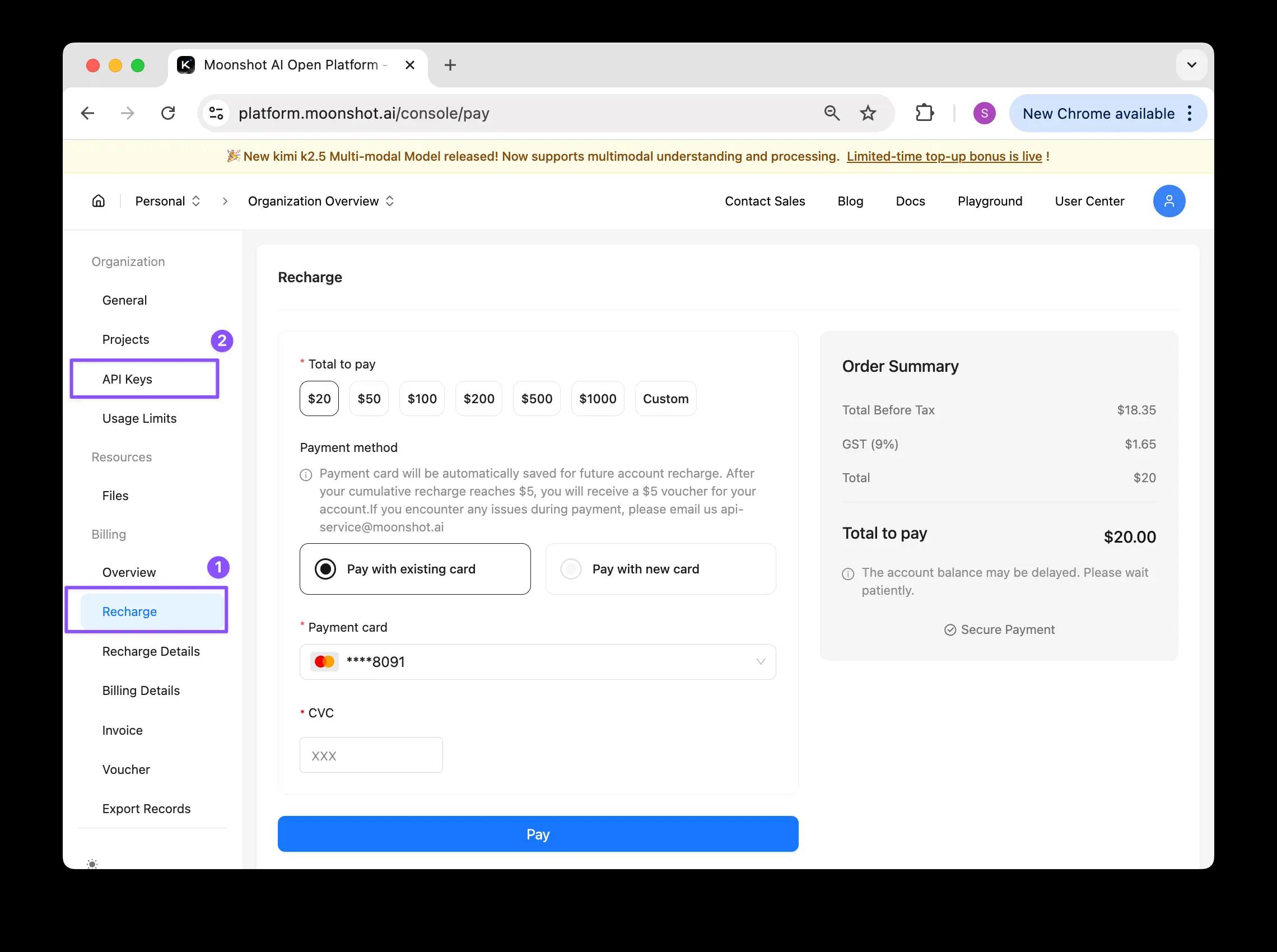
Start by creating an account on the Moonshot AI (Kimi) platform (opens in a new tab). Newly registered accounts have no balance, so recharging is required before the API key can be used.
It’s recommended to upgrade to Tier 2 to reduce rate limits and achieve smoother usage.
After recharging:
- Go to the API key creation page
- Create a new API key
- Copy and save the key securely, as it will be needed during OpenClaw setup
Step 2: Install OpenClaw on your local system
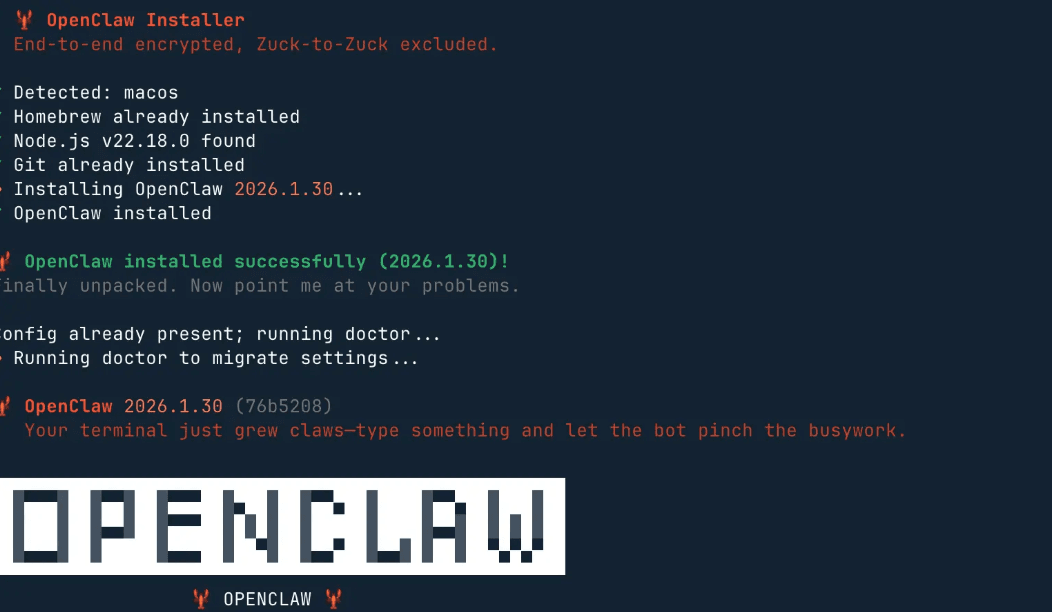
OpenClaw is installed directly from the terminal using a single command. Open your terminal and copy-paste the command below:
curl -fsSL https://openclaw.ai/install.sh | bashThis command downloads and installs OpenClaw automatically.
If the installation starts successfully, you will see a setup prompt on your screen.
When prompted:
- Select Yes to continue
- Choose QuickStart when asked for installation mode
This option sets up OpenClaw with recommended defaults.
Step 3: Configure OpenClaw to use the Kimi API
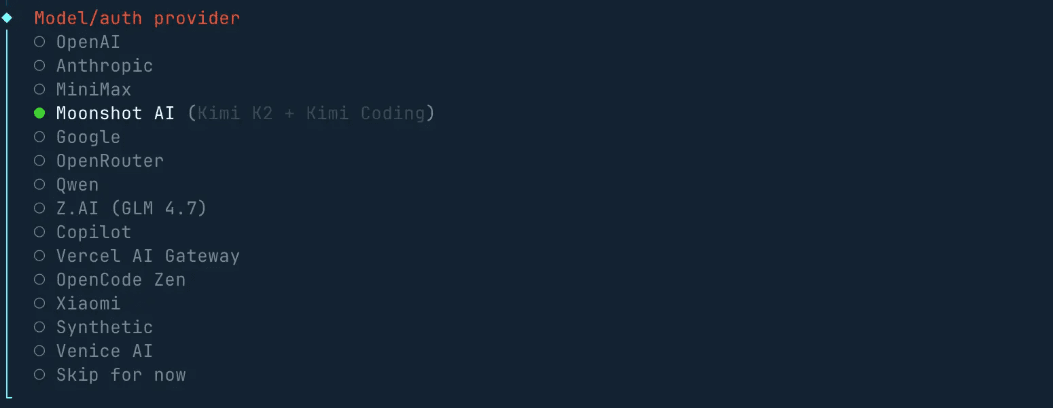
During the configuration stage, OpenClaw will ask you to choose a model provider and authentication method.
Follow these selections carefully to keep the workflow consistent:
Model auth provider → Select Moonshot AI (Kimi K2 + Kimi Coding)
Model AI auth method → Select Moonshot AI API Key
Enter Moonshot API Key → Paste your copied Kimi API key
Default model → Select moonshot/kimi-k2.5 (kimi k2.5 cix 250k)
This ensures OpenClaw runs entirely on the Kimi K2.5 model.
Step 4: Finish setup and skip optional integrations
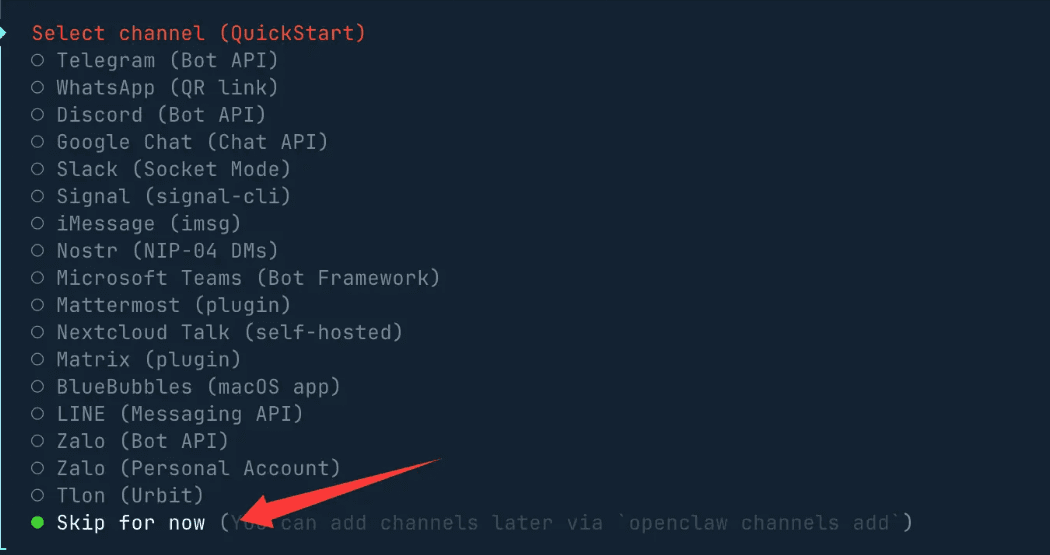
Next, it will ask you to select a chat tool. You can safely choose Skip at this stage and continue.
For the remaining settings:
- Gateway Port: Keep the default value 18789
- Skills: Skip or press the space bar only if you want specific skills
- Package manager: Select npm or keep the default
- Other API keys: Select No if you don't have them
- Final hooks (logs and session records): You may enable them or leave defaults
These settings can be changed later if needed.
Step 5: Launch Clawdbot and start chatting
Once installation is complete, it automatically runs locally.
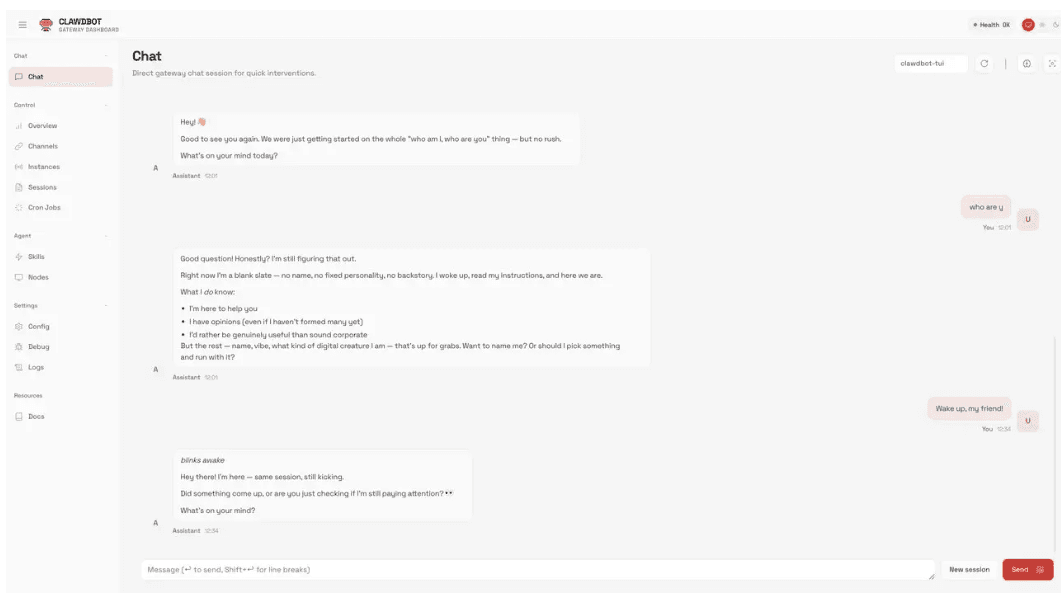
Open your browser and go to: http://127.0.0.1:18789
This opens the OpenClaw chat interface, where you can immediately start interacting with your AI assistant powered by Kimi K2.5.
Conclusion
Clawdbot's legacy as one of the first autonomous task agents laid the foundation for today's AI platforms, inspiring tools that act independently across multiple apps. Integrating models like Kimi K2.5 further enhances these agents, adding advanced reasoning, coding, and multitasking abilities.
Looking ahead, autonomous AI agents are set to become more intelligent, adaptive, and seamlessly integrated into both personal and professional workflows, shaping the future of productivity.
FAQs
Did Clawdbot change its name?
Yes. The project was originally known as Clawdbot and was later renamed Moltbot before becoming OpenClaw. Today, OpenClaw is the current name under which the project is actively developed and maintained.
Is Clawdbot still actively developed?
Yes, its core concept continues to influence modern AI agents, though its active development has largely transitioned into OpenClaw. OpenClaw builds on Clawdbot's foundation, adding community-driven updates, integrations, and support for models like Kimi K2.5. This ensures that its legacy lives on through a more advanced and maintained platform.
What is Clawdbot used for?
Clawdbot is mainly used to automate tasks inside chat applications like WhatsApp, Telegram, Slack, and email platforms. It handles reminders, workflows, updates, and routine actions without constant user input. This makes daily work smoother by reducing manual effort and keeping tasks running in the background.
How to enhance the power of OpenClaw?
The easiest way to extend OpenClaw's capabilities is by integrating powerful models like Kimi K2.5. With Kimi connected, OpenClaw can handle more advanced reasoning, coding assistance, and multi-step task execution across different platforms. Combined with OpenClaw's agent framework, this setup enables a flexible and capable AI assistant that adapts to a wide range of workflows.
2026 © Moonshot AIConsoleDocs